Guide
Quick gearing
How to try a sprocket change and see speed in every gear.
What it does
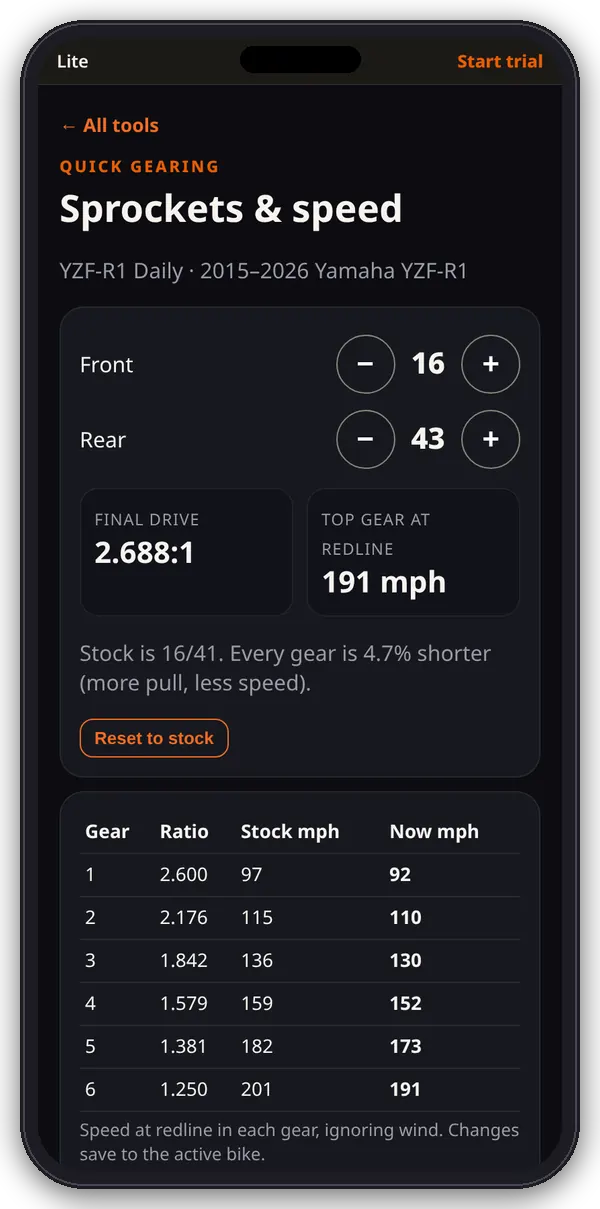
Quick gearing shows the final drive and the speed at redline in every gear for the active bike, stock against your new sprockets. For rpm at cruise, shift drops, aero top speed and pulls, use the gearing bench.
1. Change sprockets
- Open Quick gearing from the hub.
- Tap − and + for the front (10–24 teeth) and rear (28–60 teeth). Reset to stock goes back to the stock pair.
2. Read the results
- Final drive: rear ÷ front.
- Top gear at redline: speed in top gear at redline, ignoring wind.
- A note says how much taller or shorter every gear is than stock.
- The table lists each gear’s ratio with stock mph and new mph at redline.
3. Next steps
- Changes save to the active bike, so Chain length and Roll-on pulls use the new sprockets.
- Links at the bottom go to Change bike, Chain length and Edit this bike.
How it’s worked out
mph at redline = redline × π × rear tire diameter × 60 ÷ (primary × gear ratio × rear/front × 63,360). Real top speed is usually lower because of wind.