Guide
Edit bike
How to change a bike’s numbers or enter a bike by hand.
What it does
Edit bike holds the numbers the quick calculators use. Bikes added from the database come pre-filled from the gearing bench library. A hand-entered bike starts from the example bike’s numbers until you change them.
1. Open it
- From the Garage, tap Edit on a bike, or + Enter a bike by hand for a new one.
- The Edit bike card on the hub opens the active bike.
2. Fields
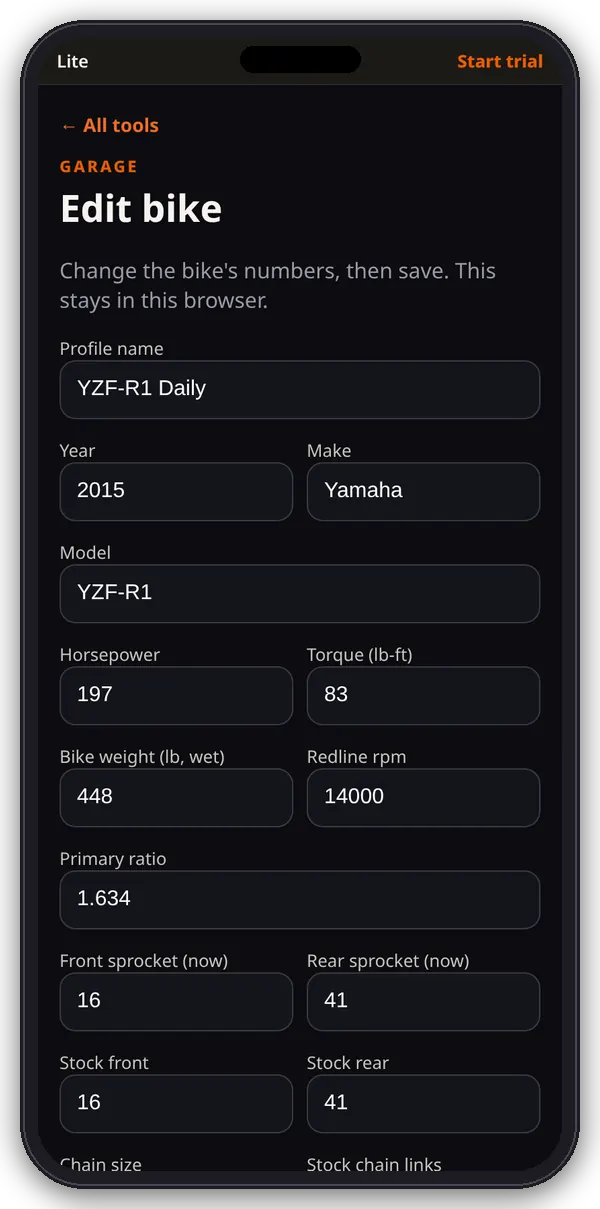
- Profile name, year, make and model.
- Horsepower and torque (lb-ft), bike wet weight (lb), redline rpm and primary ratio.
- Front and rear sprocket now, plus stock front and rear (the calculators compare against stock).
- Chain size (420, 428, 520, 525, 530 or 630) and stock chain links (the Chain length tool needs this).
- Rear tire width, aspect and rim.
- Gear ratios from 1st to top, separated by commas (at least 3).
3. Save
- Tap Save bike. The app checks horsepower, weight, redline, primary ratio, sprockets and the gear ratios, and tells you if one is missing.
- Saving makes the bike active and takes you back to the Garage.
Tips
Use your owner’s manual or a factory spec sheet for the primary and gear ratios. Count the links on your current chain if you’re not sure of the stock number.
Where the numbers live
Everything here is saved in this browser on this device (the garage list, active bike, pulls and dyno entries). It doesn’t sync to other phones or browsers, and clearing the site’s data deletes it.