Guide
Bike database
How to find your bike in the library and add it to the garage.
What it does
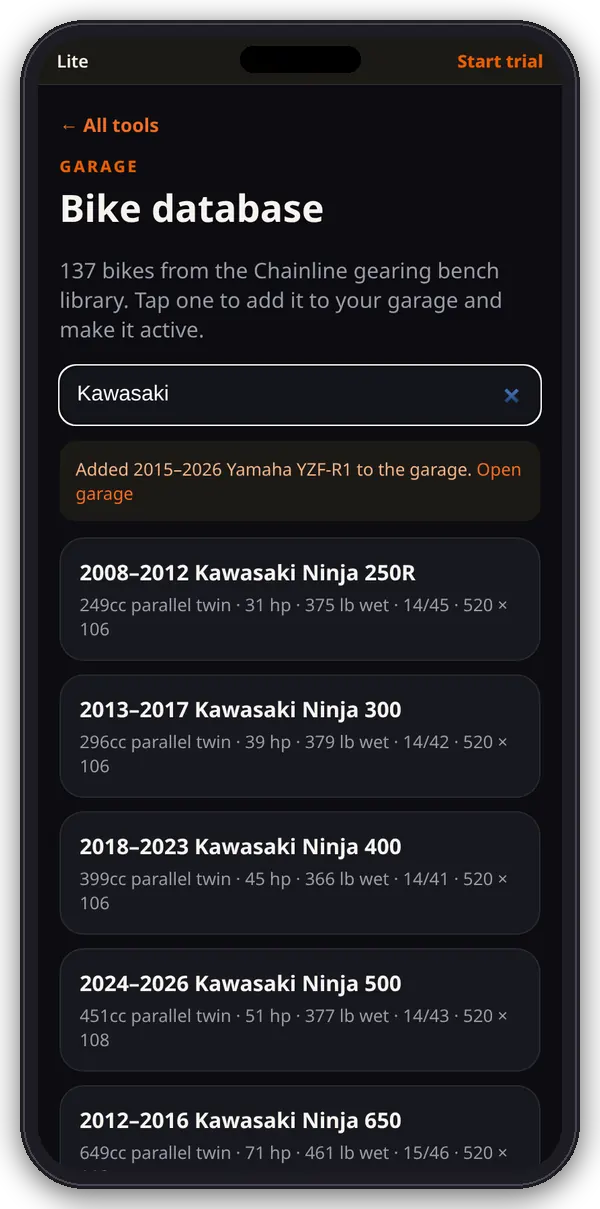
The Bike database lists the 137 bikes from the Chainline gearing bench library, with the same published figures the bench uses.
1. Search
- Open Bike database from the hub.
- Type a year, make, model or engine in the search box. The list filters as you type.
- Each row shows years, make and model, engine, horsepower, wet weight, stock sprockets and chain size × links.
2. Add to your garage
- Tap a bike. A copy named “model Daily” is added to your garage and becomes the active bike.
- A note confirms it, with a link to open the garage.
- Change anything you’ve modified (sprockets, tire, power) in Edit bike.
Not listed?
Use + Enter a bike by hand in the Garage, or the gearing bench’s Bike not listed option.
Tips
The figures come from owner’s manuals, factory spec sheets and sprocket catalogs. Confirm sprockets, pitch and link count on your bike before you order parts.